
HTTPS encrypts the information exchanged between a website visitor’s browser and the server. An SSL certificate is required to use HTTPS. Zone’s web hosting users receive a Let’s Encrypt certificate free of charge.
HTTPS is enabled by default on new web hosting accounts and subdomains
When a new web hosting account or subdomain is created, a free Let’s Encrypt certificate and HTTP-to-HTTPS redirection are configured automatically.
You do not need to enable HTTPS separately or order a certificate manually.
For the certificate to be issued automatically, the domain or subdomain must point to the corresponding Zone server through its DNS records.
If your website still uses HTTP
For an existing web hosting account or subdomain where HTTPS is not yet enabled, you can install a certificate by following the instructions below.
Switching your website to HTTPS may also require changes to your website software settings. You can find instructions in the following articles:
Installing a Let’s Encrypt certificate
Follow these steps only if HTTPS is not yet enabled on your web hosting account or subdomain.
- Open your web hosting management panel in My Zone.
- Select
Webserver→SSL/TLS certificates. - Click
Addnext to the relevant domain or subdomain.
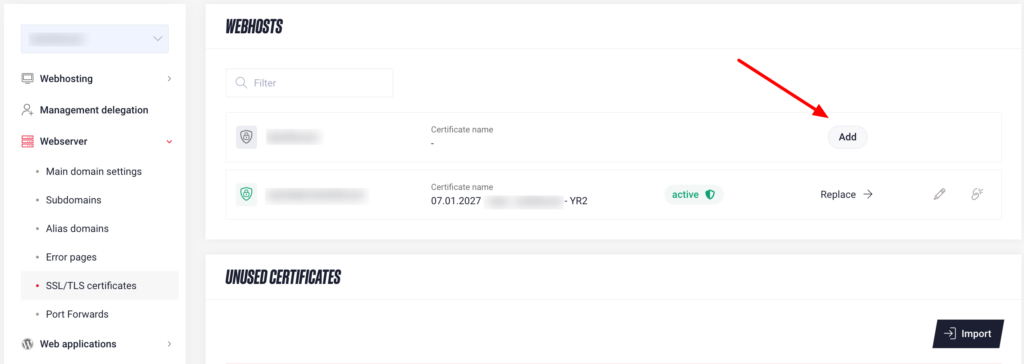
Once the certificate has been successfully issued, it is installed on the server and HTTPS is enabled automatically. HTTPS connections will become available within 15 minutes.
If an error message appears during certificate issuance, contact SpeedZone’s customer support.